Thirteen tips for getting better sleep

I go through stages of having issues sleeping. I usually find it easy to go to sleep, but either dance around like a fish out of water or wake up between 2 am and 4 am and then don’t get back to sleep. If you sleep like a baby, ignore these and keep doing what you are doing, but one or more might help if you have issues like me.

  1. Have a sleep routine: go to bed and get up at the same time each day, even on weekends to take advantage of your natural circadian rhythm.
  2. Sleep for between six and nine hours every night: The amount of sleep you need is dependent on several factors, set a fixed wake-up time and move around your sleep time depending on how you feel each morning until you find the duration you need.
  3. Get as much sleep before midnight as possible: research suggests that this is when the best quality sleep happen. Set your bedtime between 9:30 and 11:00 pm.
  4. Get light outside for at least 30-60 minutes per day: Getting out right after you get up will help anchor your master clock that controls your circadian rhythm. A lack of Vitamin D affects sleep, so supplement if you don’t get exposed to a lot of sunshine, particularly in Winter.
  5. Don’t eat anything after 8 pm: Leaving time between eating and going to bed will allow your insulin levels to get back to normal.
  6. Have a wind-down routine: have a hot bath, write a todo list to get things out of your head, do some light relaxation stretches, listen to relaxing music, read a book (use a Kindle Oasis with no blue light)
  7. Avoid screens for at least an hour before you go to bed: blue light from screens will trick your brain into thinking it is daytime and make it harder to get to sleep.
  8. Don’t drink coffee after 1 pm: Caffeine can affect people for up to six hours after a coffee. If you can, only use coffee for those times when you need a cognitive boost.
  9. Make your bedroom a cave: keeping your bedroom dark, quiet, and at a cool temperature (between 18C and 24C) to help you get to sleep quicker.
  10. Eat more protein during the day and carbs at night: Protein is a mild stimulant and carbs activate the orexin pathway that makes you sleepy. 
  11. Take a ZMA supplement 30 minutes before sleep: The magnesium specifically aids sleep but prepare for some strange dreams the first few nights. 
  12. Exercise but not too much: Staying active throughout the day is essential for your general health and insulin responsiveness, but training twice per day or long and intense cardio sessions will negatively affect sleep. Consider regular movement breaks if you work at a desk all day and strength training three times per week between 3 an 6 pm.
  13. Track your sleep and monitor things that affect its quality: I wear my Garmin running watch at night to monitor my sleep duration and quality during periods where I don’t sleep well. I find I get good sleep duration but low quality with minutes of deep sleep in the single figures. Tracking your sleep will help you learn which of these tips you can ignore and which you need to follow.
Sixteen hours per week of deliberate practice

I have been reading and watching a lot of the late Charles Poliquin this week. In a video this morning, he talked about the amount of learning you need to do to be world-class at what you do:

Eight hours per week is the minimum you need to learn… The people that make the most money in their profession learn sixteen hours a week… The more you know, the more you realise you don’t know.

Charles Poliquin

Charles Poliquin was well-read and based all his recommendations on expert knowledge, so I spent some time looking for this recommendation’s origin. I returned to the ‘Role of Deliberate Practice in the Acquisition of Expert Performance‘ paper by K. Anders Ericsson to see how these recommendations for developing masters compare. The article presents research from multiple sources that it takes ten years or more of necessary experience to develop the skills to produce outstanding work at a world-class level. This practice should be time-limited at 2-4 hours per day, every day, for many years. This recommendation was present in research on experts from chess, musical composition, mathematics, tennis, swimming, long-distance running, scientists, authors, and poets.

The average age of the first published works was 25.2 for scientists, and 24.2 for authors and poets and the average age at which they published their most remarkable work was 35.4 for scientists and 34.3 for authors and poets. There was an average of more than ten years between the scientist and authors first work and their best without considering the time it took learning and writing to get to the first publication. The highest performance levels were not attained just by years of experience but by deliberate efforts to improve slowly over a very long time.

Deliberate practice is a set of activities that are most effective in improving performance. It requires the motivation to do the task and effort to improve performance. These activities are repeated consistently with slight variation and should provide immediate informative feedback. The idea of deliberate practice in developing scientists and artists is very similar to athletes and musicians’ development. This development involves years of intensive preparation under an expert teacher, total emersion in the field, and most importantly, identifying the most likely activities to result in the desired achievements.

When looking at scientists, the highest performing are also those who produce a larger number of publications than others in their field. This would suggest that writing to develop arguments would be the deliberate practice that helps them develop a new published theory or idea. Writing is a demanding activity; most world-class scientists stick to a rigid daily schedule that involves writing as the first significant activity of each morning and is time blocked to 1-2 hours, leaving the rest of the day to other work.

In virtually all domains, there is evidence that the most important activity – practice, thinking, or writing- requires considerable effort and is scheduled for a fixed period of time during the day. For those exceptional individuals who sustain this regular activity for months and years, its duration limited to 2-4 hours a day, which is a fraction of their time awake.

K. Anders Ericsson

Two to four hours per working day would be equal to ten to twenty hours per week. To hit Charles Poliquin’s sixteen hours of learning per week target, we would require just over three hours of learning or around 40% of a typical eight-hour working day. The question then is, what is a Learning Designer’s deliberate practice that will allow them to become world-class, and how do I provide an environment to help Learning Designers do this deliberate practice to gain mastery?

The length of time between each iteration of a course makes the day to day work of a Learning Designer unsuitable as deliberate practice, so I need to find something more immediate. My wife is launching a company and becoming active on social media to market the brand. The kinds of skills she is learning are very similar to those that make an excellent Learning Designer—developing Learning Designers as Youtubers might be an effective strategy. Youtubers produce regular video content that is published, continually work to improve all aspects of quality, operate on social media and interacting with viewers to drive traffic to their youtube site, and using the analytics tools to track activity and inform future content. This might be a crazy idea, but it might just work.

Focus and flow with the Pomodoro technique

The Pomodoro technique is a simple way to increase your productivity and is particularly useful when working from home. You work in intervals of focused work with breaks of rest away from your desk. The breaks help your brain focus, gives space to assimilation new information or incubate new ideas, builds in time for you to make a coffee or use the toilet, and provides an opportunity for movement breaks.

The basic idea 

  1. Select a task or set of tasks
  2. Set a timer for 25 minutes
  3. Get your head down and work uninterrupted until the timer goes off 
  4. Take a 5-minute break away from your desk before starting step one again. 
  5. After a set of 4 Pomodoros, you give your self a 15-30 minute break.

Work expands so as to fill the time available for its completion.

Parkinson’s law

The six objectives

Once you are in the habit of separating your working day into Pomodoros, the 25-minute work intervals and breaks, work through the six objectives in sequence, only moving one once you have mastered the current objective.

  1. Time tracking – Become great at estimating how long tasks will take by tracking how many Pomodoros you need to complete all your focused work.
  2. Lazer Focus – Protect your work interval from all interruptions, extend the breaks to call people back or deal with emerging issues, but when you work you work.
  3. Estimate time needs for all tasks – Use your estimation skills gained from objective one to estimate how many Pomodoros you need for all activities in your todo list.
  4. Make your work interval more effective – Start your work interval with a few minutes to recap what you have done and end it with a review.
  5. Create a schedule – Plan out each day according to your todos and time available, scheduling in Pomodoro sessions in the slots available between commitments.
  6. Create your a personal objective – Come up with an objective that will make you more focused or better find time to complete your work.

Learn more in the Pomodoro Technique Handbook by its creator Francesco Cirillo.

Daily stand-ups for remote working

From the first day of lockdown in March, I have held a daily catch-up with my team first thing each working day. The main intention was to give the team a feeling of connection and maintain a level of routine. It also helped to get us through a hectic work period moving a university of 33,000 students from campus-based delivery entirely online. 

The daily conversations kept everyone aware of changes, got quick answers to questions, and it allowed emerging problems to get identified and fixed before they got too big. Interestingly, I tested the idea of scrapping the catch-up after planning the new academic year in October, and the whole team rejected it. I wanted to give everyone back a couple of hours of their week, but the team saw it as the best part of their working day. We had a week off the meetings in the end, but they have become the centrepiece of how we plan and run our projects.

A ‘stand-up’ meeting is 10-15 minute informal meeting where attendees stand to force them to keep it short. Queen Victoria introduced stand-ups with her Privy Council in 1861 to minimise her public duties. More recently, it has been adopted by various agile project management methodologies, including Scrum and Kanban. The goal is to increase workflow through collaborative problem solving and signpost things that will soon cause problems. 

How to run a daily stand-up

  1. Book out a daily meeting first thing in the working day. I book mine for 25 minutes to keep some space reserved in the calendar if follow-up conversations are needed. The aim is to have them complete in 15 minutes.
  2. Keep them as conversations but short and to the point. I use the first 5 minutes for social discussion and then a quick update from me including a what I completed yesterday, what I am doing today, and what I need from the team.
  3. Get each member of the group to do a 60-second status update. Ensure each person shares and let some conversation naturally emerge but once it starts to get into detail intervene with “Let us carry this on outside of the stand-up”. Each member should share:
    1. What they are will complete today.
    2. Requests for collaboration.
  4. End the meeting with an opening for questions or issues that the team want to raise. A final opportunity to talk usually brings up a few questions, and so is worth adding. 

We use Microsoft Teams with a reoccurring meeting invite to host the video call. Using Teams allows the chat channel to stay open for social and work conversations to continue for the rest of the day. We set a rule early on that video is needed to make the calls more personal and people stick to it most days. Working from home can be isolating, and the social element of an office is hard to replicate. A short daily call acts as an icebreaker and helps keep the team collaboratively solving problems while having some fun. 

Have a go with your team and let me know how it goes on Twitter

Project Management Basics

The first step towards a mature development process for developing online courses is to introduce some project management basics. According to the Project Management Institute, a project is a temporary endeavour undertaken to create a unique product, service or result. For a set of tasks to be a projectthere must be a start and end date and produce a one-off output. The three core tasks for managing a project are cost and effort estimation, task allocation, and risk management.

Resist the ad hoc. Announce that this is a project, and that it matters enough to be treated as one.

Seth Godin

Here are ten suggested actions to get you started with managing your projects:

  1. Set a start and end date and identify your critical path; each task’s last possible completion date allows the project to hit the end date. Identify the dates by work backwards from completion and take into account tasks dependent on the completion of another. Track task completion against this critical path, and do what is needed to hit all the deadlines, so the project ends on time.
  2. Develop a way of estimating the cost and effort involved in your projects. Understand how complexity, size, and reuse impact these estimates. Start with what you can find in literature and then review and update it after each new project is complete to improve its accuracy over time. 
  3. Keep a list of risks, possible consequences, and likelihood and introduce ways to reduce the chance of them happening to minimise disturbances during the project. Considered project risks that affect the schedule or resources, product risks affecting the final course or module, and business risks that affect the university.
  4. Assign a Project Leader responsible for the project; this should be someone who controls the critical resources such as the Academics line manager of Head of Department. Regularly communicate with the Project Lead and get sign-off from them on crucial decisions. 
  5. Produce a project schedule that includes all the tasks to be completed and their due dates, any key milestones, and gates where the key project team members get sign-off to progress. Add the critical path and start and end dates and get everyone to sign it off before work begins. Update it as things change.
  6. Send out weekly project highlights to the Sponsor/owner and Project Leader. Use a traffic light system to help them identify if they need to intervene. If in amber or red, add a brief note saying why it is in trouble and what is required to bring it back to green. 
  7. Make all your work visible and share it will the whole project team. Show the critical path, the estimates, the risks, and the schedule. Keep a record of all the weekly highlight reports and the other documents in a central location that the project team can access. Produce regular prototypes in various forms as soon as possible and regularly afterwards, share it with the intended students for feedback before the course launches.
  8. Write down everything. Record everything that people expect and everything that people promise. Let everyone know you have recorded it. Keep a log of what you’ve done and how. You will need it when things go wrong or when planning the next project.
  9. When working on multiple projects, keep a complete list in one place. Use the weekly highlights traffic light system and record the next action to move each forward. If you manage a team, get the members to do the same and keep a central list of all the projects and their status.
  10. Evaluate your projects when you sign them off. Create a lessons learned document and get the project team to list what worked and what didn’t. Integrate any changes into the process for next time.

1,000 True Fans and the Portfolio Life

In the book, The 100-year life, the authors introduce the idea of a portfolio job. To provide an individual with autonomy in their working life, they step away from full employment in a single position to take on several smaller roles that together make up the required income and creative outlets that person desires. A portfolio job requires the individual to have developed mastery in a field that they can then exploit for revenue through various products and services. It is an attractive idea for those of us that have worked hard to develop a level of mastery in our chosen fields, but it is a step away from what most of us learned in school. For knowledge workers, the two big questions are who are our potential customers and what kind of products are services can we offer them? 

1000 True Fans

Kevin Kelly, the founding editor of Wired Magazine and author, wrote an article in 2008 titled 1,000 true fans in which he argued that to be a successful creator and make a living, you only need a thousand true fans. Kelly defines a true fan as someone that will buy anything that you produce and a living as earning $100,000 per year. To make $100,000 per year as income, you must create enough to earn $100 profit from each of these true fans and then sell them directly. This calculation assumes that it is better to sell more to your existing fans than it is to find new ones and that you get to keep all the purchase price from any sale instead of giving away a percentage to an intermediary.  

The target of 1000 true fans is a number that is manageable for most people, that could be as simple as one per day for a few years. You can play with this formula depending on your field, so if you can earn more per true fan, you need fewer of them to hit the $100,000 mark. These true fans will also work for you through word of mouth marketing and attract regular fans that may purchase some but not all of your product so focusing your attention on them is far more valuable than other marketing approaches.

Kelly highlights two areas where this formula is becoming accessible to a larger group of creators. The first and more obvious reason is the internet has made it far easier to connect, build relationships, and have financial transactions directly to a vast pool of consumers. The second and less obvious reason is how network effects amplify the discoverability of niche products and put them one click away from that best selling ones.

Selling your creative output is an easy idea for traditional creatives such as musicians or artists, but what about knowledge workers?  

The Full-Stack Freelancer

Tiago Forte has built a portfolio business as a freelancer in Forte Labs and suggests seven types of product that can make up a portfolio income in his blog post ‘The rise of the full-stack freelancer.’ These income streams can mix products and services, digital and physical, and passive and active income.

  1. Social Media
  2. Blog/subscriptions
  3. Public workshops
  4. Online courses
  5. Phone coaching
  6. Corporate training
  7. Consulting

A portfolio of income streams takes advantage of opportunistic addition; doing each of these in moderation can add value and minimise the diminishing returns experienced when focusing exclusively on one area. Each of the products or services feed off each other and create a marketing funnel from free content to the higher value offerings. True fans can be developed in one direction through this funnel or move through multiple streams and back again with a monthly subscription to a premium blog, purchasing one-off highly interactive courses, and receiving a free monthly newsletter for example.

Creating a portfolio life

The idea of discovering and cultivating a relationship with a collection of individuals who will then purchase what you produce to give you a steady and comfortable living is exciting. A place to start could be to build a presence on social media such as Twitter or Instagram and begin to cultivate an audience, and an email list, through free longer-form content on blogs or podcasts. Once you have a following, you will introduce revenue-building products or services such as a book or an online course. Whatever route you choose, the portfolio life is an attractive one, and the internet has made it easier than ever to cultivate. 

Have a conversation with me about this post on Twitter; I am interested to hear your thoughts.

Make time for what is important

I like a level of routine. Without some routine in my day, I can quickly waste away days in front of the TV. A simple way to get around this, particularly now while having a stay at home holiday, is to have at least one ‘highlight’ each day. The todo might be small, like go for a run or something fun like having a long call with a friend or family member, but something each day.

It is not that we have a short time to live, but that we waste a lot of it.

Seneca

In their book Make time, Jake Knapp and John Zeratsky of Google sprint fame, share a framework for designing your day around what matters. The four-step process focuses on choosing a highlight for the day, something you want to use to answer the question ‘what did you do today?’ and then gradually testing out tactics to help get this thing done. Over time you will test and adopt tactics that together build a daily system tailored to your life and priorities.

We want you to begin each day by thinking about what you hope will be the bright spot. If, at the end of the day, someone asks you, “What was the highlight of your day?” what do you want your answer to be? When you look back on your day, what activity or accomplishment or moment do you want to savor? That’s your Highlight.

Jake Knapp and John Zeratsky

The four steps

  1. Highlight – start each day by choosing a focal point
  2. Lazer – Beat distraction to make time for your highlight
  3. Energise – Use the body to recharge the brain
  4. Reflect – Adjust and improve your system

The most important step is choosing your days highlight. The book suggests asking yourself each morning ‘what is going to be the highlight of my day? Choose an activity that takes around 60-90 minutes, it can contain multiple steps and might be work-related, personal care or even something from your honey-do list. Before you go about your day, select the time you will do this highlight and protect it. Add it to your calendar and let people know that you are busy at that time.

Once you get to the scheduled time, you need to make sure you can focus on that one task and nothing else. Becoming distraction-free might require you to turn off any technology not needed in your task or go somewhere away from your usual setting. To make sure you have the energy to do the things you want the book suggest a load of tactics from taking care of your body with regular exercise, good sleep patterns (naps!), and healthy food, to the strategic use of caffeine before your task for a quick pick up.

Each evening, the authors suggest taking a few notes on how well your new system is working. Did the tactics make time for your task, focus on it, and have the energy to do it work? If yes, keep them, and if no, ditch the ones not working and replace them with new tactics to test.

Try it tomorrow

Tomorrow morning, get up and write down a task you want to do that will take around an hour and choose when you will do it. Make it something that you really want to do but might not make the time for usually due to the day’s natural run. When that time comes around, make a coffee, turn off your phone, and do it. In the evening, think about how you got your highlight done, your energy levels, when you scheduled it. What could you do better to get tomorrows highlight done? Simple, but maybe not easy.

Pick up a copy of Make time: how to focus on what matters every day to find the full explanation of the process and an extensive collection of tactics to help you build your system. Let me know on Twitter what tactics work for you.

My perfect desk setup

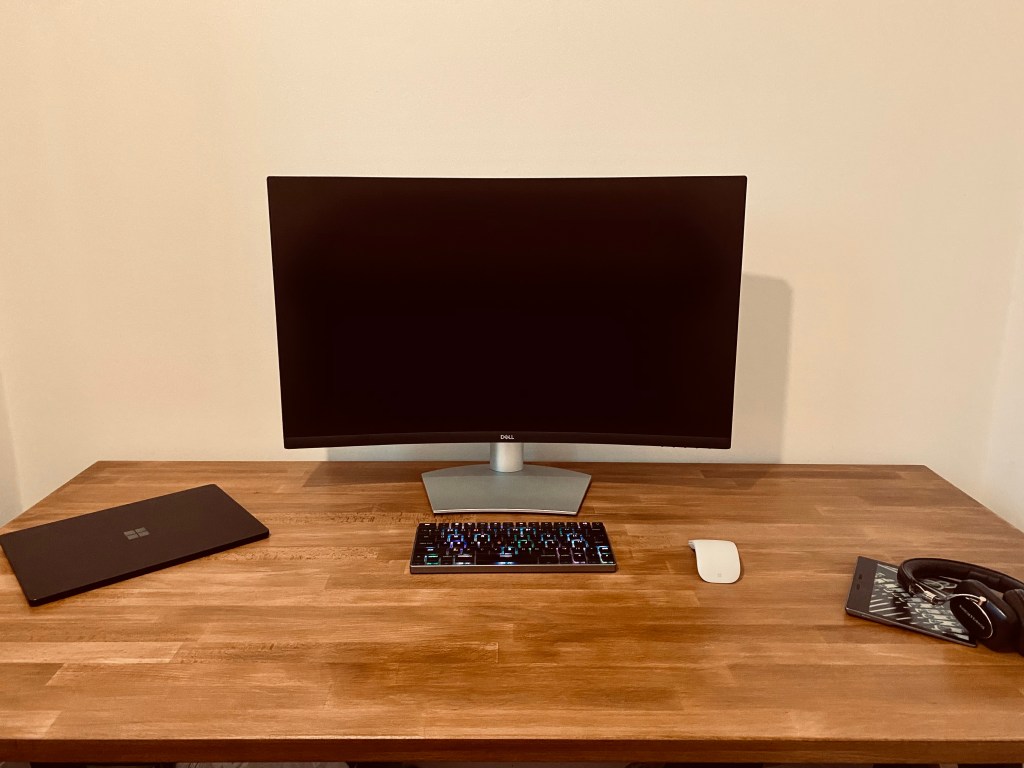
I spend a lot of time at my desk. Working from home for the last nine months has allowed me to play with my setup and tweak it gradually. I can’t tell you if it improves my productivity, but it is comfortable, and it does look cool.

Today I got a new desk as a Christmas present. I like a large space to work, and I love having an authentic wood surface. I thought about a standing desk, but with the volume of training, I like to sit when I am working. As long as I keep up my 4-minute movement breaks, my 30 second hangs three times per day, and sit correctly; I don’t feel the need to stand all day to be healthy. I have gone with the GERTON Beech Tabletop (155×75 cm) with some trestle legs from Ikea and have varnished it with a dark oak finish. 

There is something about Eames chairs that is special. I originally wanted the soft pad low back design as they look great, but I have never been a big fan of too much padding. I ended up going with the high back ‘managers’ chair and found a high-quality replica from By Kallevig.

The monitor is the computer. I have tried multiple screen setups including double 27-inch widescreen monitors, but I was never a fan of the bezel. An alternative would be a 49-inch ultrawide screen, but I like to have a bit of hight too. I have settled on a 4K 32-inch curved monitor from Dell. The size gives me space for two windows side by side, and the screen is easy on the eyes.

The built-in keyboard on both my laptops are great, but I use an external device when working at my desk. My current choice is the wireless Vinpok Taptek, is the first mechanical keyboard I have used, and I am not going back. It is a pleasure to type with and has colourful backlights that respond to the keys that add a nice touch. It has a mac layout which can be an issue when using my work laptop, but I like it and can’t bring myself to replace it with a PC layout alternative. 

I have had an apple magic trackpad for years, but last year I was given a Microsoft Surface Arc mouse by work, and I have been using that instead. It feels great in hand, has a touchpad on the front that gives you lots of control, and snaps flat for travel.

For my laptop, I rotate between my recently purchased work-issued i7 Surface Laptop 3 and my personal, and much older MacBook Air. Of the two, I prefer the Microsoft device and use the Surface almost exclusively. It has a high-quality touch screen, plenty of power, and I find Windows to be really useable for working.

For music, I have a pair of B&W P5 headphones. I have been a die-hard fan of Bowers and Wilkins since I was lucky enough to visit Abby Road recording studios at school as part of a tour of EMI set up by the British Arts Council. In every room, they had 800 series speakers that sounded out of this world, and so I have not bought speakers from another company since. 

Now I have my new desk; I want to add a desk plant to lighten up the room and add some green and have been looking at Little Botanica for options. After that, possibly some speakers? Perhaps a pair of Formation Flex desktop speakers with a Formation Bass sub? We shall see…

Let me know of Twitter about your setup.

Level 5 Leadership

In the book Good to Great, Jim Collins presents his research into companies that outperformed the market over a significant amount of time. One of the common themes that emerged from most of these companies was the idea of level 5 leadership. These successful companies had leaders with the capabilities to develop greatness within a company through ‘a paradoxical combination of personal humility plus professional will.’ 

The five-level classification hierarchy of leaders:

  1. The highly capable individual
  2. The contributing team member
  3. The competent manager
  4. The effective leader
  5. The executive

Professional will is described as an ability to get things done, not taking personal credit to successes, generating excellence, and planning success beyond their duration at the company. Personal humility is described as avoiding praise, calm work, emphasising standards over inspiration, a focus on company success over individual success, and taking personal responsibility when things go wrong.

The five levels are a hierarchy, so to be a better leader, one approach would be to work through each level. Alternatively, developing the capabilities of professional will, and personal humility is an excellent place to start to become a high performing leader. A few areas to think about include;

  • Obsessively work on your productivity and create a system
  • Publicly give credit to those that deserve it when things go right
  • Clearly define excellence within your area
  • Start succession planning for your role and develop those under you to be able to progress when the time comes
  • Be hyper-organised and understand risk in your area so you can react to things calmly
  • Use company metrics as a measure of success and see personal heroics in a project as a failure of planning
  • Review your decisions and actions when things go wrong and do what is required to fix them

Get in touch on Twitter if you have ideas about how you can work up the hierarchy.

Sharing tasks in Microsoft To Do

The Microsoft productivity suite has seen significant integration improvements over the last year or two. The institution I work at uses Office365, so to reduce friction, I have been making the jump from the stack of third-party tools I have using for some time to their Microsoft equivalents. Two of the essential tools I use to manage my work and keep my email controlled is Microsoft’s Calendar and To Do apps. To Do is a simple app but its best feature is its ability to create tasks from emails by merely dragging them into the ‘My Day’ pannel., that email is then easily accessed from that task later. 

Now I am used to managing my on tasks with this new app, and I am getting the benefits, I want to extend this to my team but have found that it is not as simple as solo task management. 

You have to:

  1. Create a sub-list
  2. Share a web link to this sub-list
  3. Assign tasks to members of the sub-list (only once that person has accessed the sub-list via the link)

It would be much easier if you could use the institution’s Active Directory to assign any task in any list, or a whole sub-list, to someone else, but this may come shortly.

To start with, I have created and shared a task list for each of my direct reports but moving forward, once the habit has been established, it will make more sense to have a shared list per project and include all members of the broader team in the relevant project task lists too. 

You can find guides on sharing tasks and everything else on the Microsoft To Do support pages

Get in touch with me on Twitter if you are using O365 and have tips or have any questions.